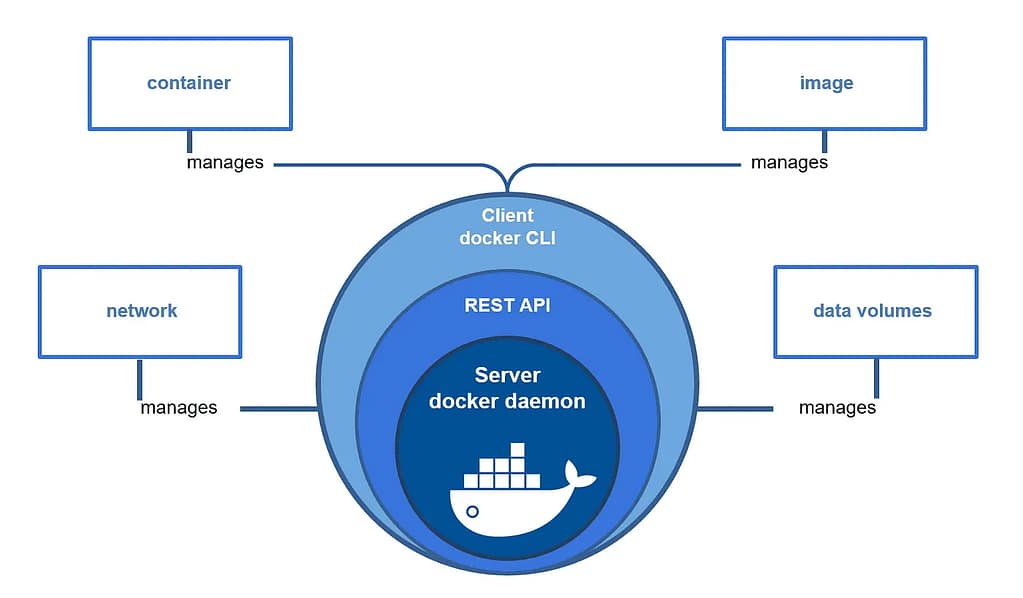
A container is a lightweight way to package an application along with everything it needs to run, such as libraries, dependencies, and configuration files. Instead of installing software directly on a server and hoping all versions match correctly, a container bundles everything into one unit that runs the same way on any system. Docker is the most popular container platform and is widely used in both industry and academic environments. With Docker, developers can build an application once and run it consistently across different machines without worrying about compatibility issues.
Containers are different from virtual machines because they share the host operating system instead of running a full OS for each application. This makes containers much faster to start and more efficient in terms of memory and storage usage. As a result, containers are commonly used in cloud computing and DevOps workflows to deploy applications quickly and scale them easily. For example, a website can be deployed using multiple identical containers to handle increased traffic.
For this IS 5320 course project, using Docker also helped me understand how modern web applications are deployed in real-world environments. Instead of treating WordPress as just a website, I could see it as a service running alongside a database inside containers. This showed how applications are built using multiple components that work together. Overall, Docker made the technical idea of containerization much easier to understand in a practical deployment setting.
References
Docker overview: https://www.docker.com/resources/what-container
Docker documentation: https://docs.docker.com/get-started
About Me Agent Airbus Application AWS Boeing Career Chennai Cloud Computing CMS Containers Course Data Science Destinations Docker Education Energy Football GA4 Google Analytics Hobbies Hometown HW Interests Lifestyle MLS Navigation Night Northern Lights OpenAI Personal Plane Spotting Professional Rain Seattle Simulation Summary Sunset Tags Travel Virtual Servers Web Development Windmill WordPress World
0 Comments