Time Log – Time spent on other students’ sites
Date: Jan. 17, 2026 From: 06:05 pm To: 06:40 pm
Date: Feb. 18, 2026 From: 07:30 pm To: 08:10 pm
Date: Feb. 19, 2026 From: 08:05 pm To: 08:25 pm
Date: Feb. 21, 2026 From: 10:05 pm To: 11:25 pm
Summary of your activities and new contents created
This week, I focused on creating new posts that reflect my personal interests and current topics I care about. I created a post about the MLS season start and shared my thoughts as an Inter Miami fan, especially my reaction to the disappointing opening game against LAFC despite high expectations with Messi leading the team. I also created another post about my experience using OpenAI Agent Builder, where I described how intuitive and powerful it feels to build AI agents using a drag and drop workflow. In addition, I configured categories, tags, and enabled commenting to make the site more interactive and organized. These posts help make the website more personal and engaging while also showing my interests in sports and AI.
Links to new contents created:
Inter Miami post
Summary of your Event in GA4
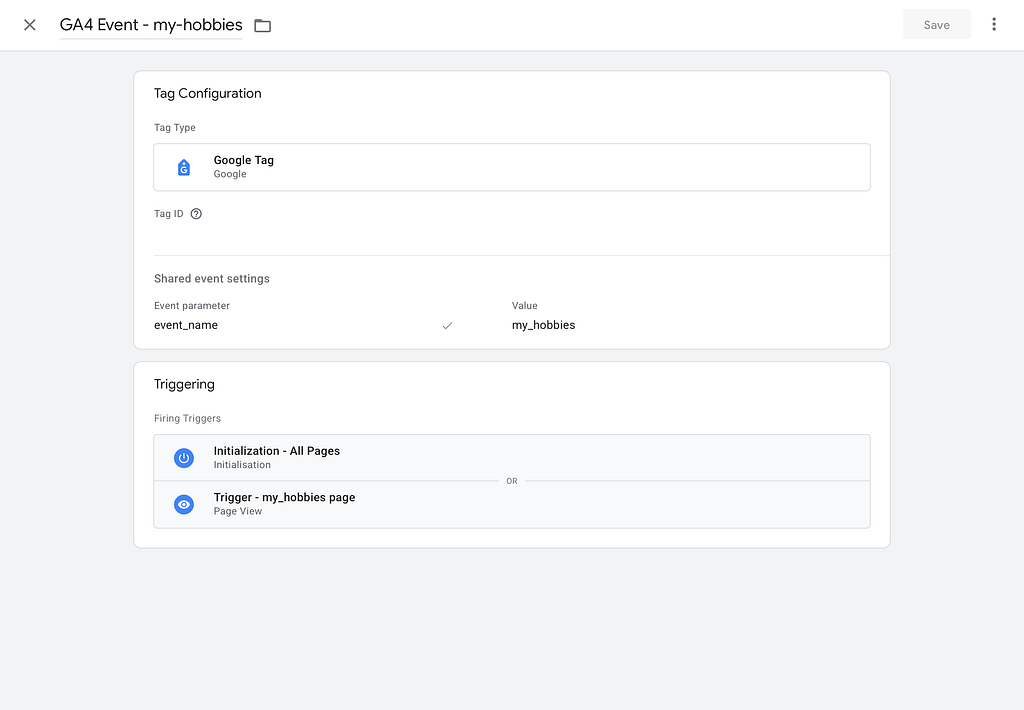
This week, I created and configured a custom event called my_hobbies using Google Tag Manager and connected it to my GA4 property. This event is triggered when users visit the hobbies page on my website, using a page view trigger specifically set for that page. The event is linked to my Google Tag with Measurement ID, which ensures the interaction is properly recorded in GA4. This allows me to track when visitors access that page and confirm that event tracking is working correctly. By monitoring this custom event in GA4, I can better understand user interest in specific content sections and verify that my analytics implementation is functioning as expected.
Best use case of custom events in GA4
One of the best use cases of custom events in GA4 is tracking specific user actions such as clicking important buttons or interacting with key features. For example, a custom event can track when a user clicks a signup button, opens a blog post, or interacts with a specific element on the site. This helps website owners understand what users are actually doing beyond just visiting pages. Instead of only knowing how many visitors came to the site, custom events provide deeper insight into user behavior. This makes it easier to improve the website experience and focus on the features that users find most valuable.
About Me Agent Airbus Application AWS Boeing Career Chennai Cloud Computing CMS Containers Course Data Science Destinations Docker Education Energy Football GA4 Google Analytics Hobbies Hometown HW Interests Lifestyle MLS Navigation Night Northern Lights OpenAI Personal Plane Spotting Professional Rain Seattle Simulation Summary Sunset Tags Travel Virtual Servers Web Development Windmill WordPress World
0 Comments