Time Log Teams – time spent on other Teams’ sites
Date: Feb. 23, 2026 From: 05:10 pm To: 05:55 pm
Date: Feb. 25, 2026 From: 06:05 pm To: 06:50 pm
Date: Feb. 27, 2026 From: 04:15 pm To: 05:05 pm
Date: Feb. 28, 2026 From: 07:00 pm To: 08:10 pm
Time Log Students – time spent on other students’ sites
Date: Feb. 24, 2026 From: 03:30 pm To: 04:10 pm
Date: Feb. 26, 2026 From: 05:45 pm To: 06:20 pm
Date: Feb. 27, 2026 From: 07:10 pm To: 08:00 pm
Date: Feb. 28, 2026 From: 06:10 pm To: 06:45 pm
Summary of Activities
This week I focused on building and organizing new content for my Web Analytics Lab site, while implementing conversion tracking using Google Analytics 4 and Google Tag Manager. I created new content posts with images, organized them using categories and tags, and updated both the general menu and HW menu sections to maintain proper structure for grading and audience navigation. In addition, I created a dedicated “Thank You” page and configured both a custom conversion event and a menu click event using GTM. These implementations allowed me to track user engagement more effectively and validate event tracking through GA4 reports and real-time monitoring.
Thank You Event Conversion
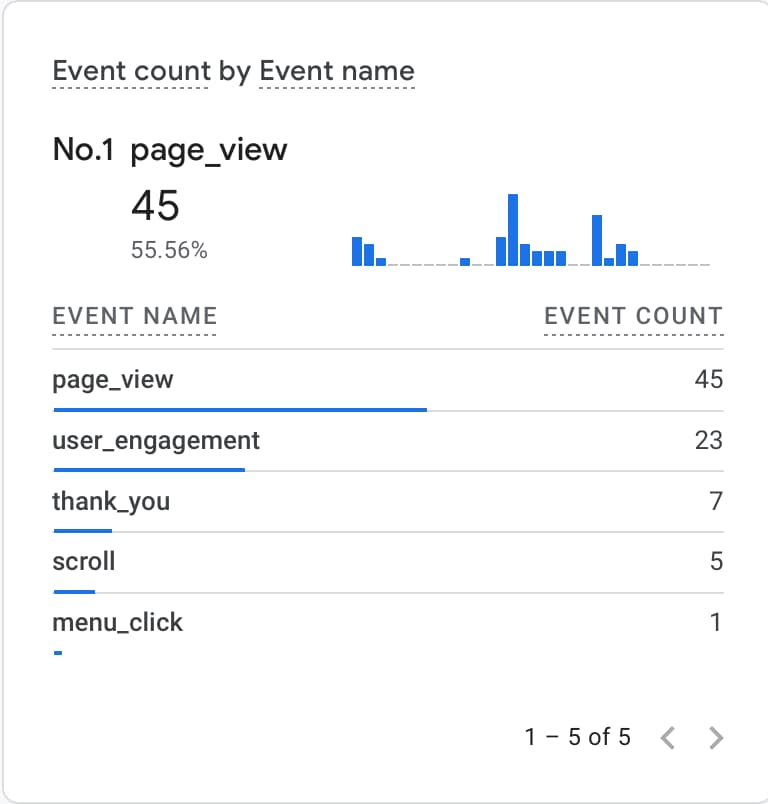
For the Thank You conversion, I created a dedicated Thank You page in WordPress and configured a custom conversion event in Google Analytics 4. Instead of relying on form submission, I implemented a page view based trigger using Google Tag Manager. When users navigate to the /thank-you/ page, the custom event is sent to GA4 and marked as a conversion. I validated the event using GTM Preview mode and confirmed it appears in GA4 Realtime and Events reports. This setup ensures accurate tracking of successful user actions tied to my site’s goals.
Menu Click Event Conversion
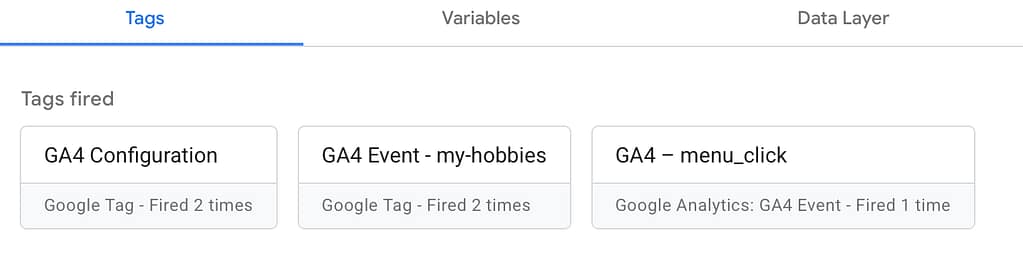
For the menu click event, I implemented a custom GA4 event using Google Tag Manager to track user interaction with my main navigation menu. I configured a Page View based trigger that fires when users navigate to the HW page (/hw/). The event is sent to GA4 as menu_click and includes event parameters such as page path. I tested the implementation using GTM Preview mode and verified the event in GA4 Realtime and Engagement reports. This setup helps measure navigation behavior and user interest across different content sections.
About Me Agent Airbus Application AWS Boeing Career Chennai Cloud Computing CMS Containers Course Data Science Destinations Docker Education Energy Football GA4 Google Analytics Hobbies Hometown HW Interests Lifestyle MLS Navigation Night Northern Lights OpenAI Personal Plane Spotting Professional Rain Seattle Simulation Summary Sunset Tags Travel Virtual Servers Web Development Windmill WordPress World
0 Comments