A content management system (CMS) is software that allows users to create, manage, and publish digital content without needing advanced programming skills. Instead of writing HTML and CSS code for every page, a CMS provides a user-friendly interface where content can be added using text editors, images, and predefined layouts. WordPress is the most widely used CMS in the world and powers a large percentage of websites on the internet. It is popular because it is free, open source, and highly customizable through themes and plugins, which makes it accessible to both beginners and experienced developers.
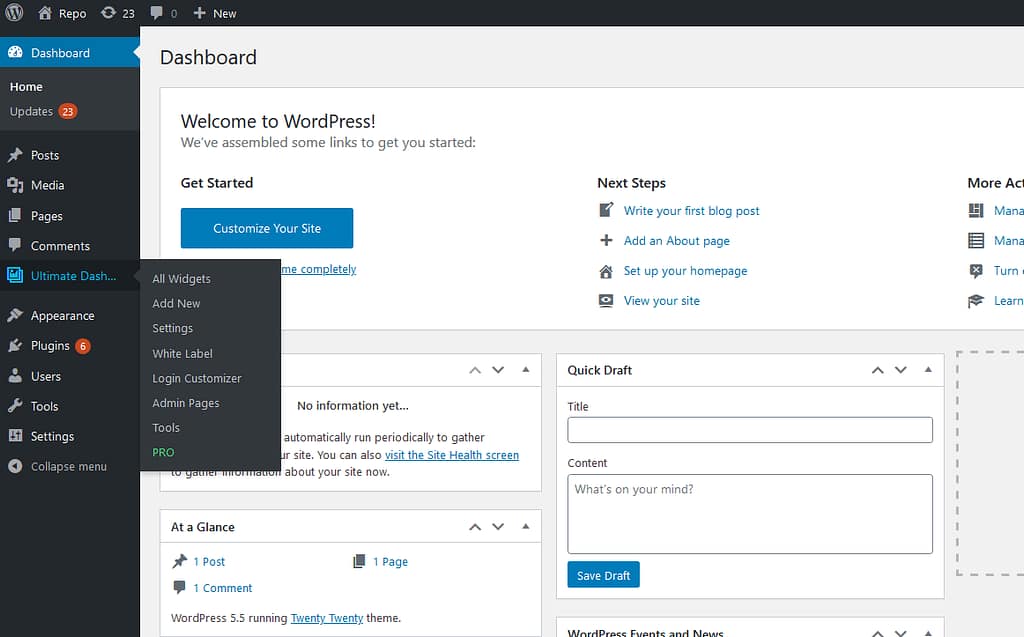
In this project, WordPress was used to build and manage the IS 5320 course website. It allowed me to create pages, blog posts, menus, and categories without writing code from scratch. WordPress also made it easy to organize content and make design changes through a visual interface, which helped me focus more on the learning goals of the project instead of low-level web development tasks. This project also showed how a CMS can be deployed in a cloud environment using a virtual host service and container technology, demonstrating how modern websites are built using multiple layers such as CMS platforms, cloud hosting, and containerization.
References
WordPress overview: https://wordpress.org/about/
What is a CMS: https://www.wpbeginner.com/glossary/content-management-system/
About Me Agent Airbus Application AWS Boeing Career Chennai Cloud Computing CMS Containers Course Data Science Destinations Docker Education Energy Football GA4 Google Analytics Hobbies Hometown HW Interests Lifestyle MLS Navigation Night Northern Lights OpenAI Personal Plane Spotting Professional Rain Seattle Simulation Summary Sunset Tags Travel Virtual Servers Web Development Windmill WordPress World
3 Comments
Shreya S · February 4, 2026 at 21:45
I really like how you connect the general CMS definition directly to your own project experience with the IS 5320 course site. Explaining that WordPress let you create pages, posts, menus, and categories without writing HTML/CSS makes the value very concrete for classmates. Your second paragraph is especially strong because you link WordPress to cloud deployment and containers, which fits nicely with how modern web stacks layer CMS, hosting, and infrastructure. Ending with the point that this freed you to focus on learning goals instead of low-level coding ties everything back to the purpose of the course.
Ankit · February 8, 2026 at 21:24
I really like how you explained what a CMS is in a clear, beginner-friendly way and how you contrasted it with writing HTML/CSS from scratch. I also appreciated the relevant images you included. They made the ideas easier to understand quickly. Your WordPress example was practical and showed how organizing pages, posts and menus can be done efficiently and the cloud + container deployment mention was a nice real-world touch.
boyarka · March 11, 2026 at 18:30
I blog quite often and I truly appreciate your content.
This great article has truoy peaqked my interest. I am going
to bookmark your blog and keep checking for new details about once
a week. I subscribed tto your Feed as well.